Blog
33 Minute
19 Best AI Video Generators in 2026 (Tested & Compared)
These tools are built for creators who need to generate original footage from text prompts or images.
Creating professional video content used to require a massive investment in equipment, software, and hours of tedious editing. In 2026, the landscape has shifted entirely. Artificial intelligence has evolved from a novelty into a powerful set of tools that can slash production time and help you move from a simple idea to a finished MP4 in record time.
After nearly a month of hands-on testing, I’ve narrowed down the best AI video generators, editors, and suites that provide the highest quality results while remaining accessible to creators.
Table of Content
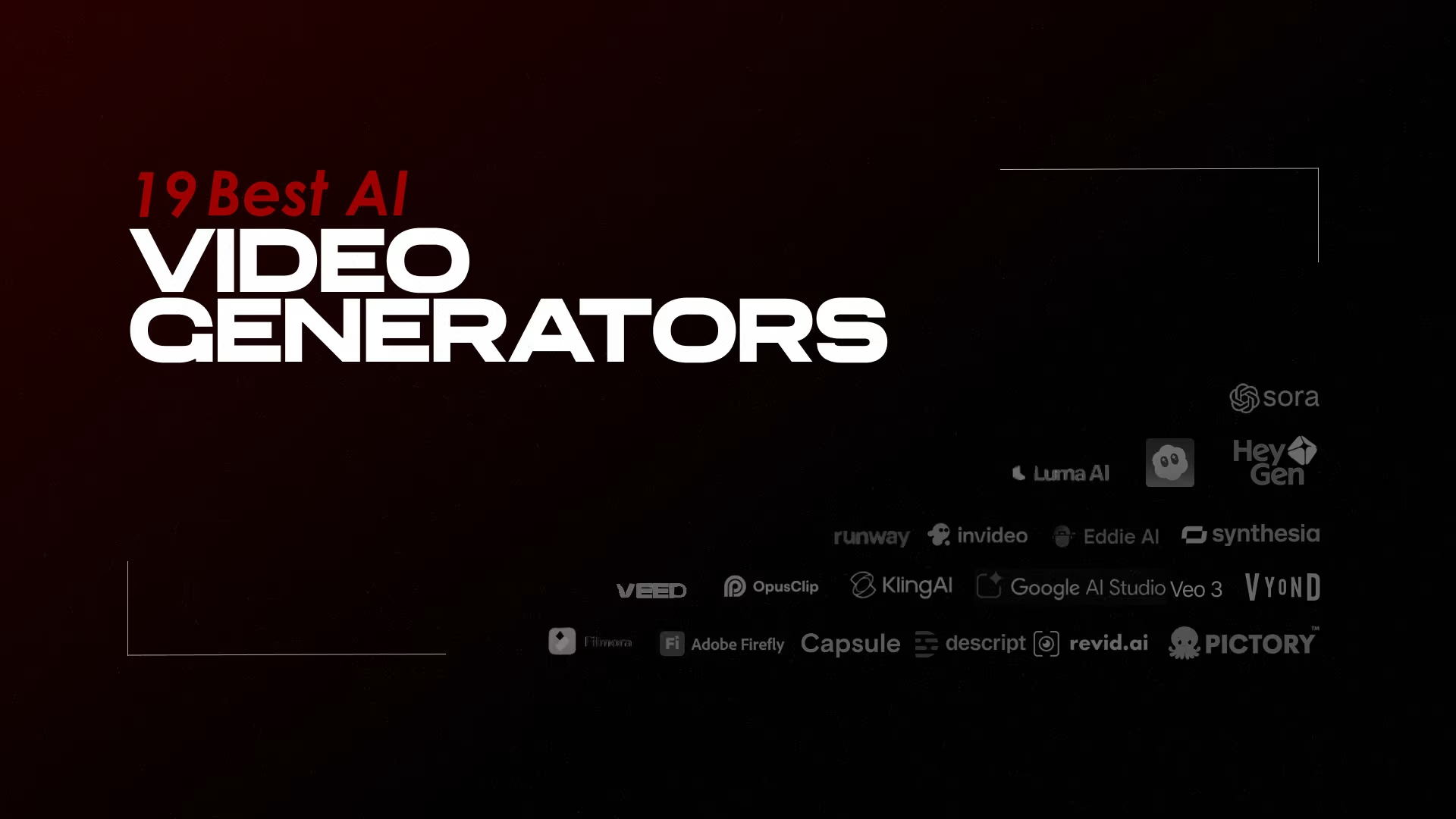
The following are the 19 best AI video generators in 2026;
- Google Veo
- Kling
- Runway
- Sora
- Luma AI
- LTX Studio
- Adobe Firefly
- Descript
- Wondershare Filmora
- VEED
- Capsule
- Eddie AI
- OpusClip
- Invideo AI
- Vyond
- Synthesia
- HeyGen
- revid.ai
- Pictory
1. Google Veo: The Best All-Arounder for Reliable Results
Google Veo 3.1 is currently one of the most balanced and the best AI video generators on the market. It excels at prompt adherence, meaning the video it produces sticks closely to your specific instructions and image references.
Key Features: It offers “ingredients-to-video,” where you can combine multiple images and text to ground the AI in your specific vision. It also features impressive lip-syncing for any dialogue you include in your script.
Pros: High-quality output with very little technical skill required.
Cons: Removing the watermark requires an expensive subscription.
Pricing:
| Free Tier | Paid Tier, per second in USD |
|---|---|
| Veo 3.1 Standard video with audio price (default) | Not available |
| Veo 3.1 Fast video with audio price (default) | Not available |
| Used to improve our products | Yes |
Source: https://ai.google.dev/gemini-api/docs/pricing#imagen-4
2. Kling
Kling AI is one of those game-changing tools in text-to-video generation, created by Kuaishou – it’s all about turning simple prompts into super realistic clips that actually impress.
What Stands Out
I’ve played around with it at the studio, and it shines with videos up to 2 minutes long (or even 3 with extensions) in crisp 1080p at 30fps. The 3D attention tech makes movements feel natural, like real physics and smooth camera pans – no more awkward jumps. Kling 3.0 just leveled up with 15-second audio-synced clips and characters that stay consistent across shots. Kling O1 is also well known for removing unwanted objects from the background.
Everyday Power
You get text-to-video, image starters, or even editing existing footage, all with solid flow and pro lighting that nails multi-subject scenes. Newer updates like 2.5 and 3.0 make it quicker and cheaper for stuff that looks straight out of a film.
Real-World Wins
It’s perfect for quick ads, social reels, or storytelling – think how it fits right into workflows at places like Storia Films, blending seamlessly with Veo 3.
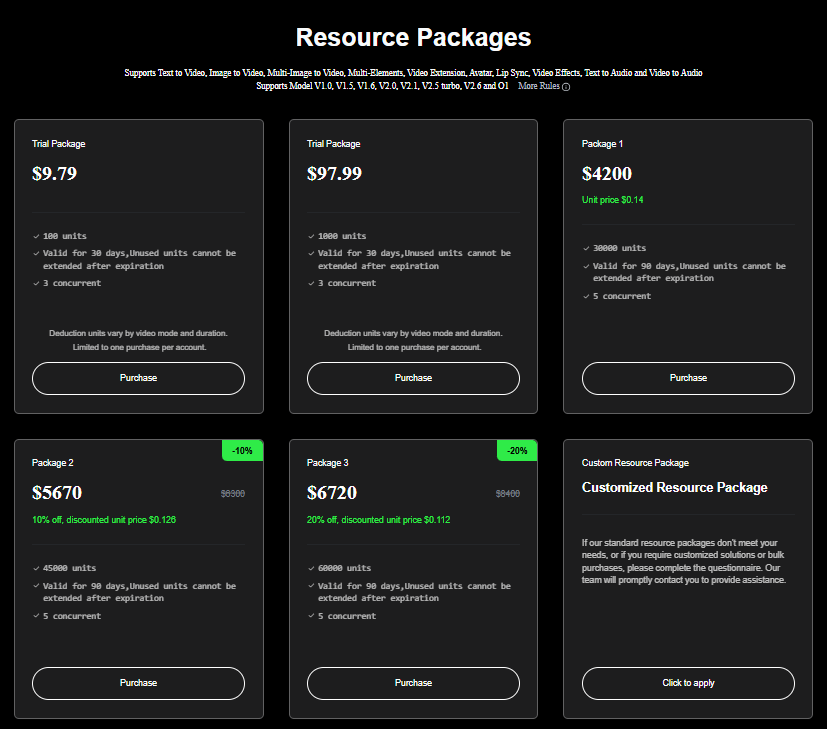
Kling Pricing:
Source: https://klingai.com/global/dev/pricing
3. Runway: The Choice for Cinematic Film-Making
If you are aiming for a cinematic look, Runway is the industry leader. It offers a sophisticated collection of models that understand film-making concepts like camera choreography and timed beats.
Key Features: The “Act Two” feature allows you to upload a recording of a human actor and map that performance onto an AI character, preserving facial inflections and emotion. The “Aleph” model allows you to transform existing footage—for example, changing the weather or replacing a car with an SUV.
Pros: Robust help resources via the Runway Academy and a suite of models for diverse tasks.
Cons: It has a steeper learning curve than most basic generators.
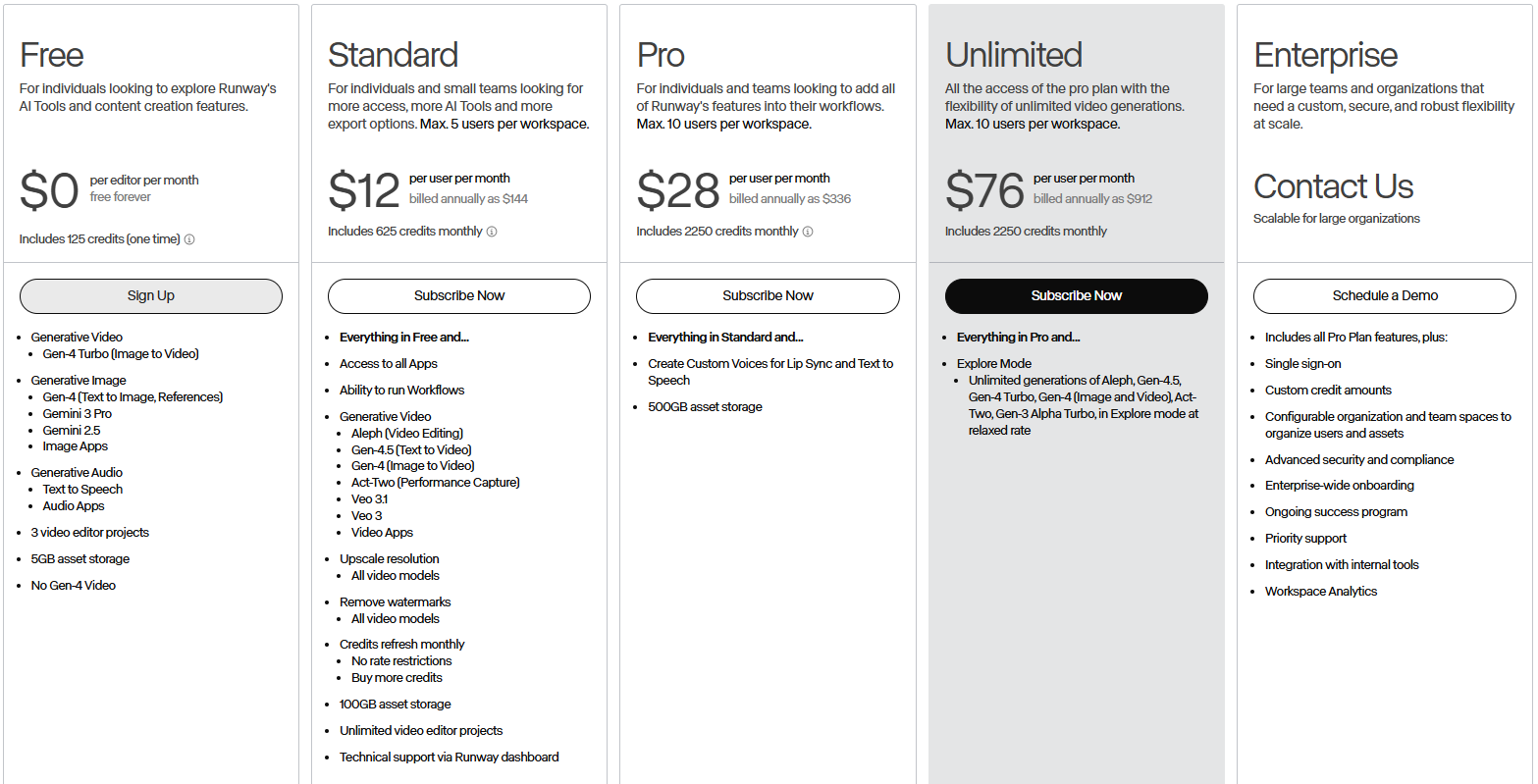
Runway Pricing:
Source: https://runwayml.com/pricing
4. Sora: Best for Narrative Storytelling
Sora 2 acts less like a simple generator and more like an AI director. It has an intuitive sense of continuity that makes it ideal for turning long stories into cohesive video sequences.
Key Features: Its “Storyboard” mode allows you to sequence generated clips to maintain character and action consistency across an entire narrative. It also allows you to upload photos of yourself or friends to star as characters in your videos.
Pros: Offers some of the highest potential output quality currently available.
Cons: It can be harder to control than Google Veo, occasionally leading to inconsistent results.
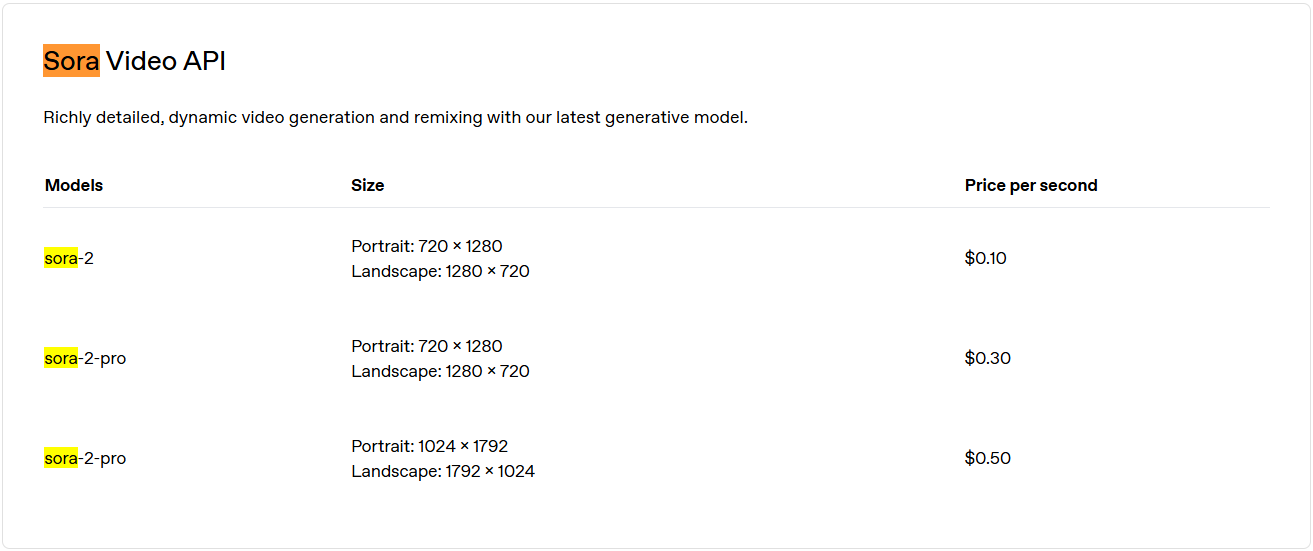
Sora Pricing:
Source: https://openai.com/api/pricing/
5. Luma Dream Machine: Best for Creative Brainstorming
Luma Dream Machine is designed for rapid iteration. It uses a “board” system that encourages you to riff on the AI’s outputs until you find the perfect look.
Key Features: You can save credits by using “draft mode,” which generates faster and uses half the credits of a full-resolution render. The interface also isolates objects and actions in your prompt, allowing you to swap them out with a single click.
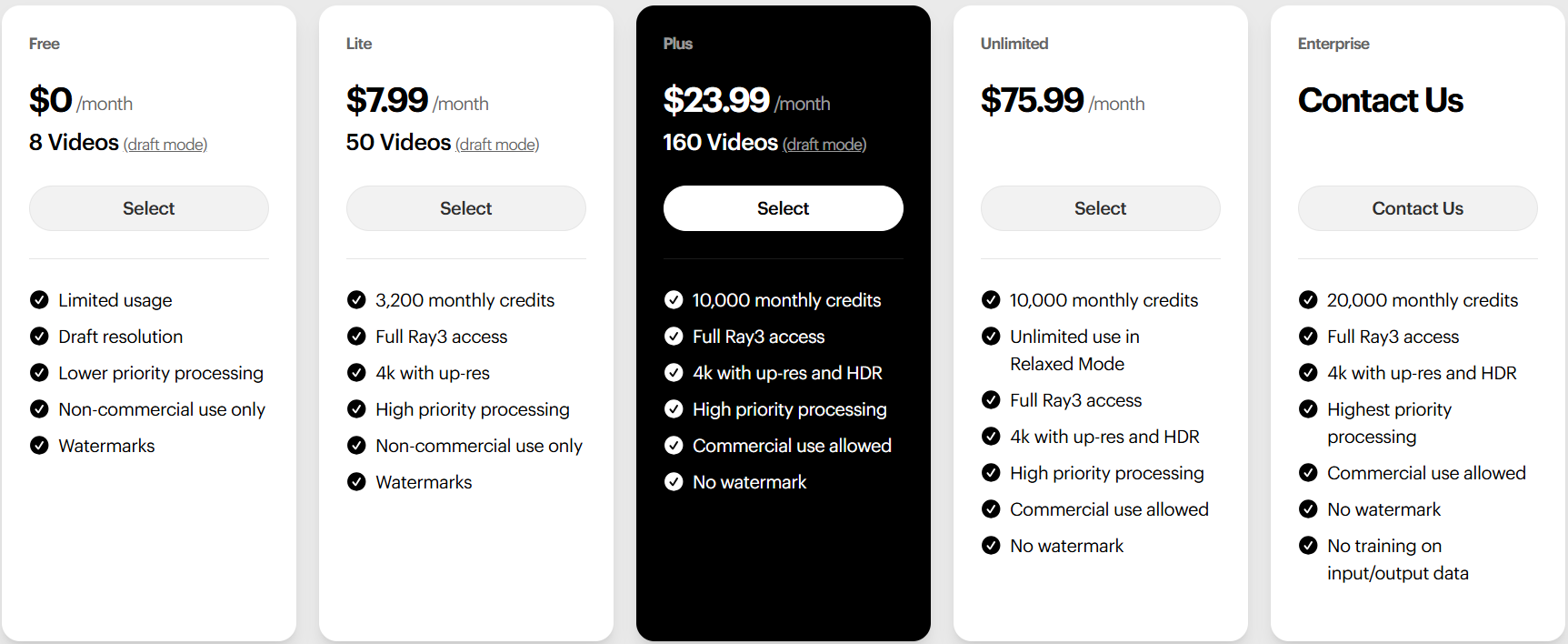
Luma AI Pricing:
Source: https://lumalabs.ai/pricing
6. LTX Studio: Extreme Creative Control
For those who want to control every single shot, LTX Studio provides a storyboarding interface that breaks your project down into scenes and frames.
Key Features: You can determine the “essence” of characters with specific instructions, ensuring they look the same across different scenes even if their outfits change.
Pros: Innovative tools for character and camera control.
Cons: Can be slow to generate results.
LTX Studio Pricing:
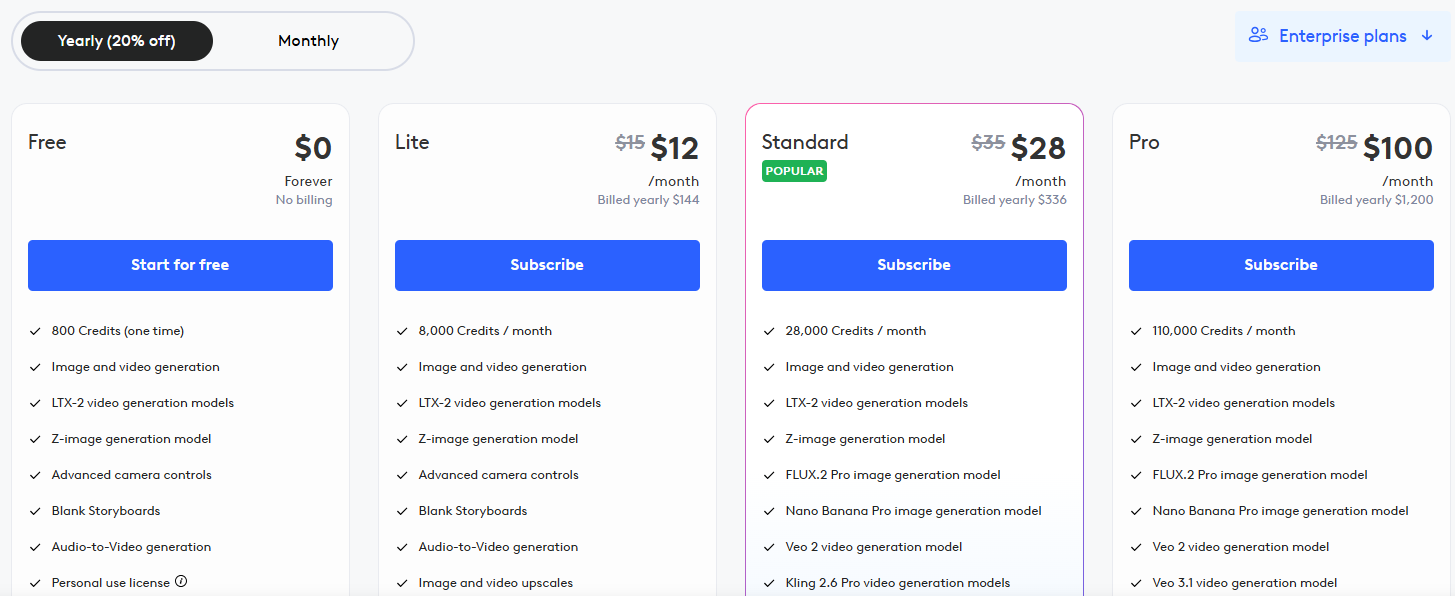
Source: https://ltx.studio/pricing
7. Adobe Firefly: Commercially-Safe Content
Firefly is the only major generator that offers contractual IP indemnification. It is trained on licensed Adobe Stock and public domain content, making it the safest choice for business use.
Key Features: Its “Generative Extend” feature in Premiere Pro can stretch a video clip by a few frames to fix awkward edit points without needing a reshoot.
Adobe Firefly Pricing:

Source: https://www.adobe.com/in/products/firefly/plans.html
8. Descript (Best for Editing via Script):
Core Functionality: It generates a transcript of your footage, allowing you to edit the video by simply deleting or moving text in the transcript, much like a Google Doc.
Key Features: Includes an “Underlord” toolkit that can automatically refine audio to studio quality, perform auto-multicam cuts to the speaker, and generate social media highlights.
Descript Pricing:
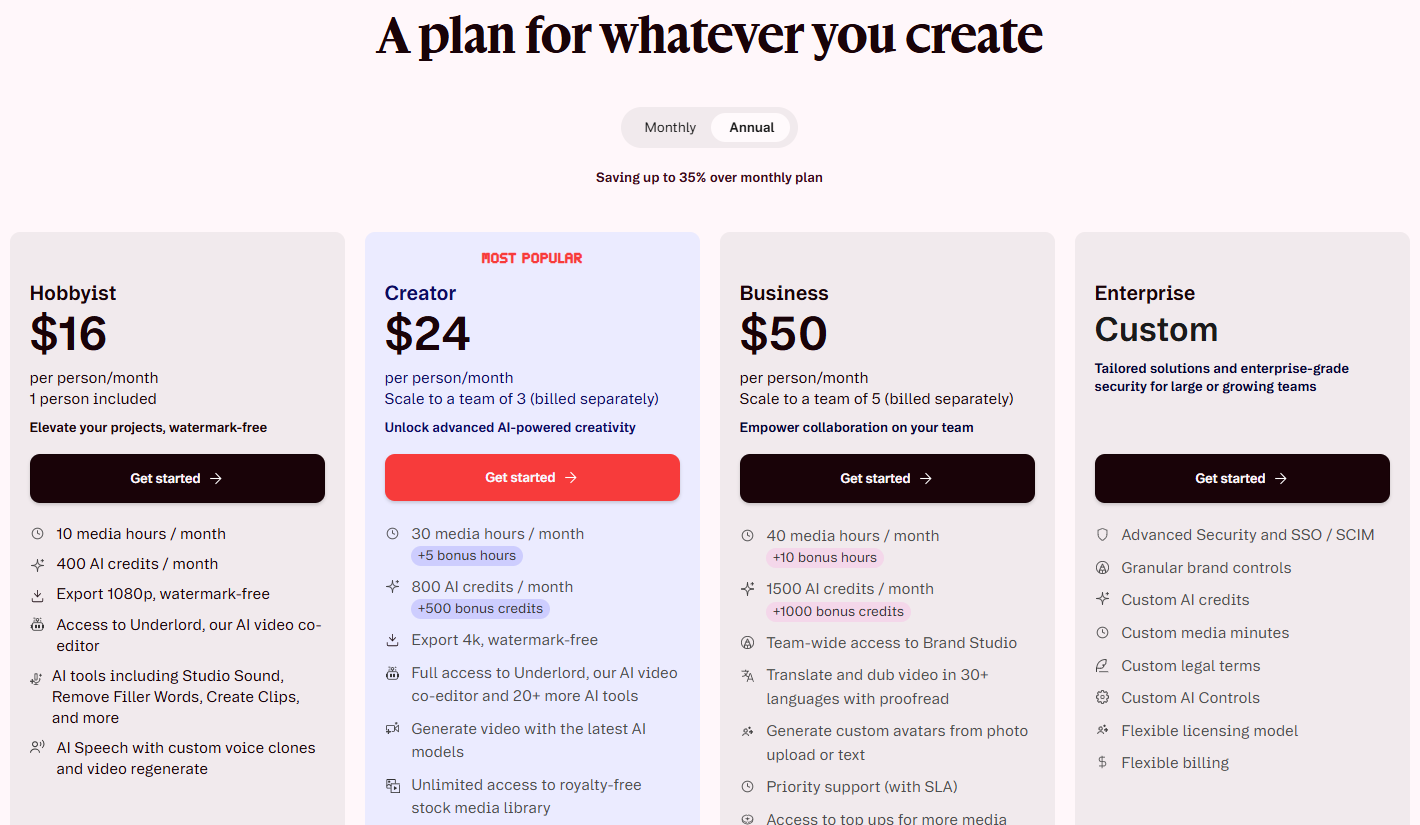
Source: https://www.descript.com/pricing
9. Wondershare Filmora (Best for Polishing with AI Tools):
Core Functionality: A traditional timeline-based editor that has integrated modern AI features to handle tedious manual tweaks.
Key Features: Features include “AI Smart Cutout” for isolating objects, “AI Audio Stretch” to match music to scene length, and “AI Silence Detection” to automatically remove hesitations.
Filmora Pricing:
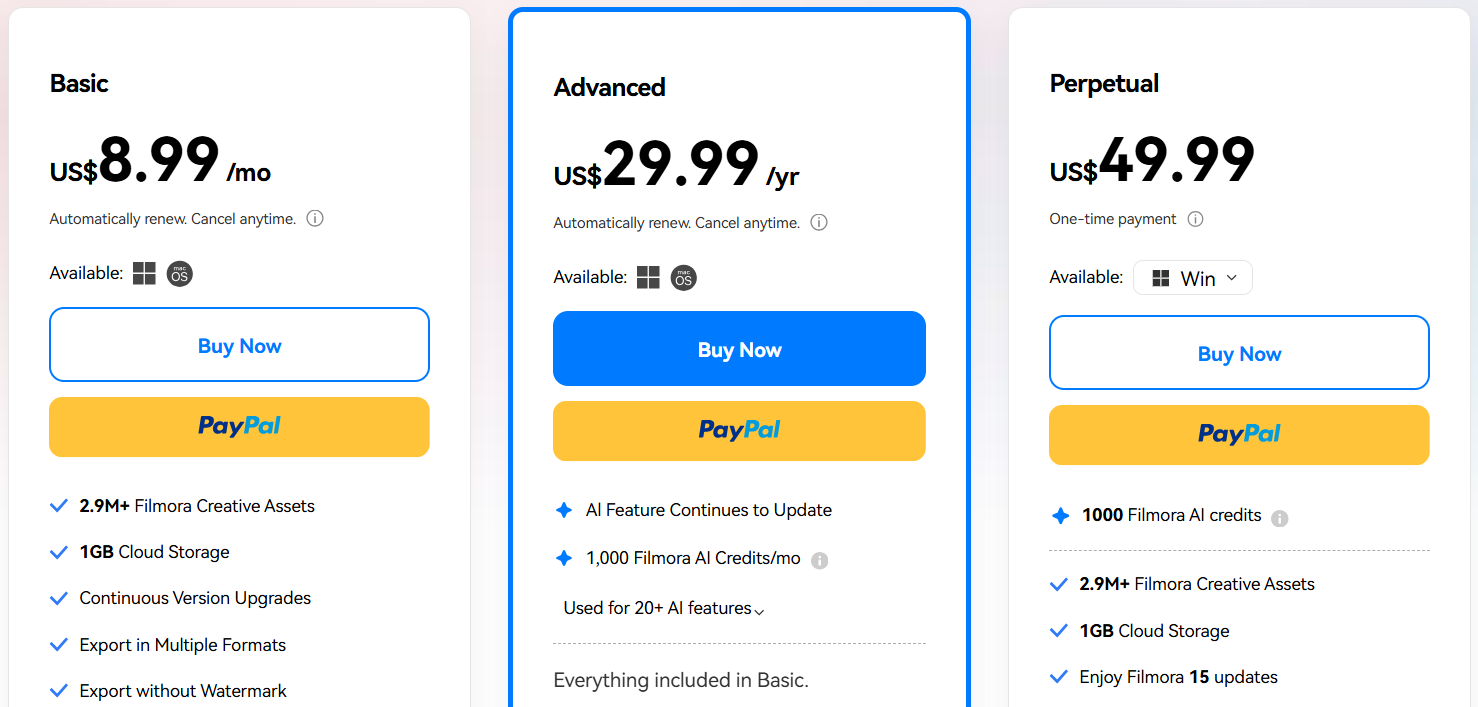
Source: https://filmora.wondershare.com/shop/buy/buy-video-editor.html
10. VEED (Best for Faster Content Production):
Core Functionality: A browser-based suite designed for high-volume social media production and team collaboration.
Key Features: The “AI Auto Edits” tool analyzes uploaded footage to adjust aspect ratios, add B-roll, and auto-caption instantly based on a chosen style.
Pricing:
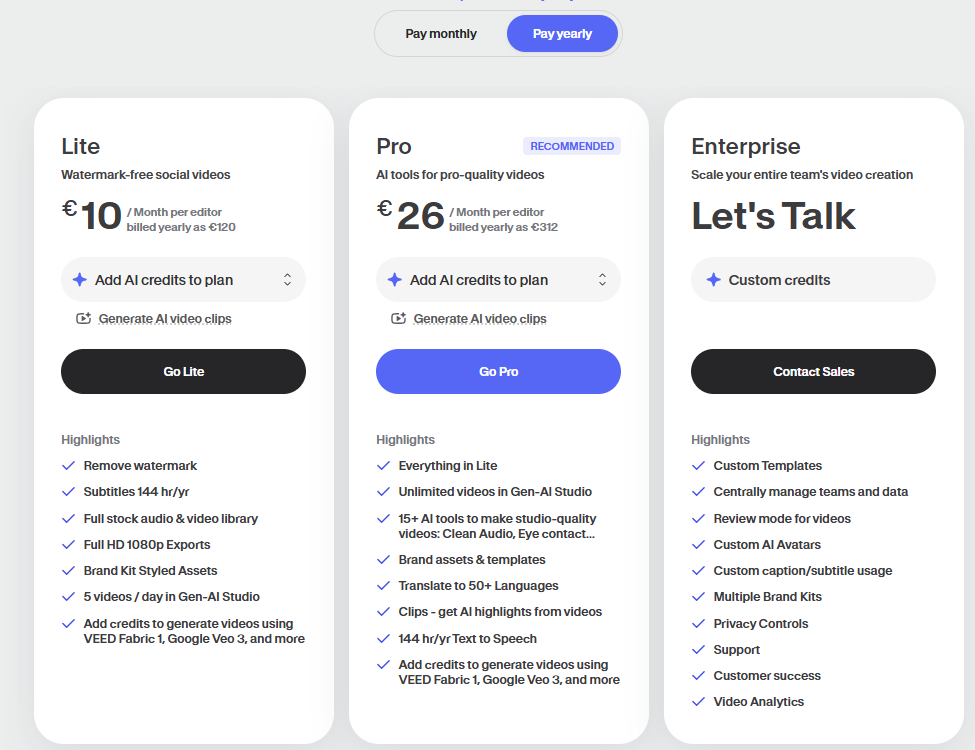
Source: https://www.veed.io/pricing
11. Capsule (Best for Branded Video Workflows):
Core Functionality: Tailored for businesses that need to scale production while maintaining strict branding standards.
Key Features: It uses “Capsule designs,” which are pre-made, animated visual elements (like speaker IDs and calls to action) that can be added to a transcript-based edit with a few clicks.
Capsule AI Pricing: Not disclosed yet
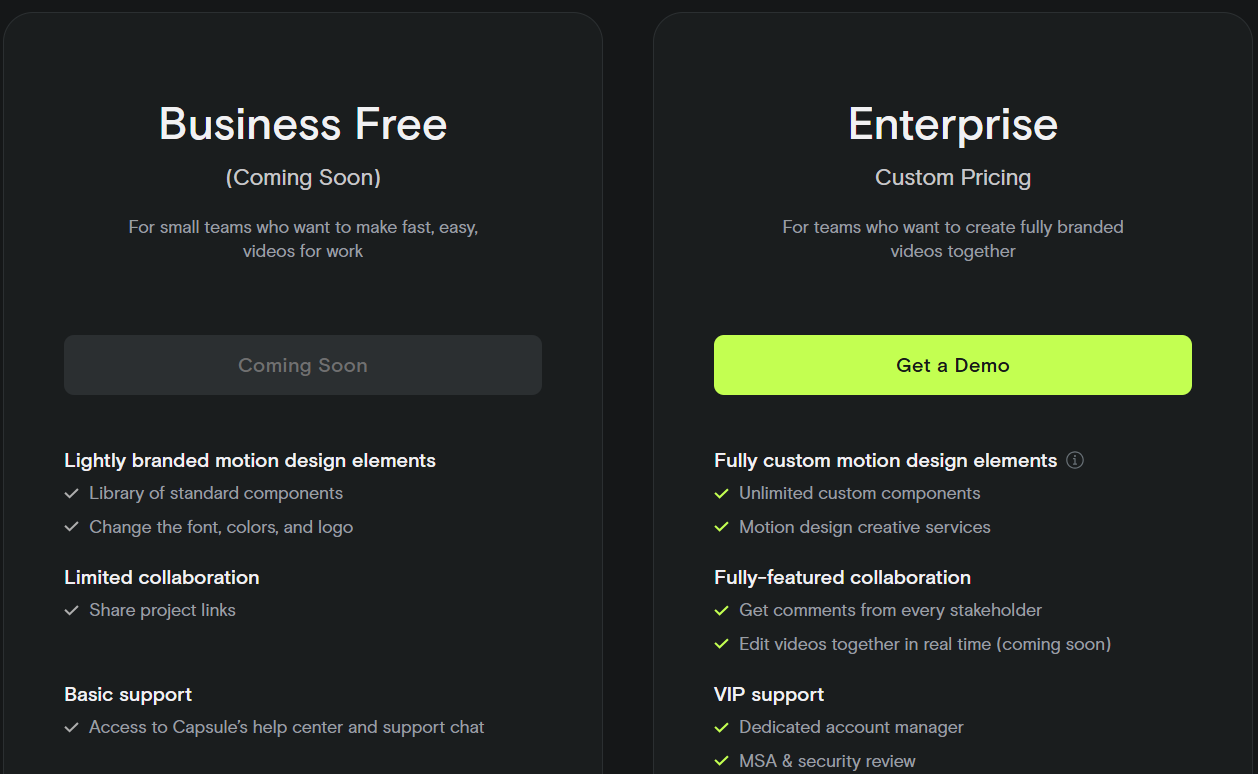
Source: https://capsule.video/pricing
12. Eddie AI (Best for Getting a Rough Cut Fast):
Core Functionality: Automates the most time-consuming part of editing: labeling raw footage and assembling the first rough cut.
Key Features: Users can interact with the AI via a chat window to find specific moments in footage or request a cut of a specific duration (e.g., “create a 10-minute cut”).
Eddie AI Pricing:
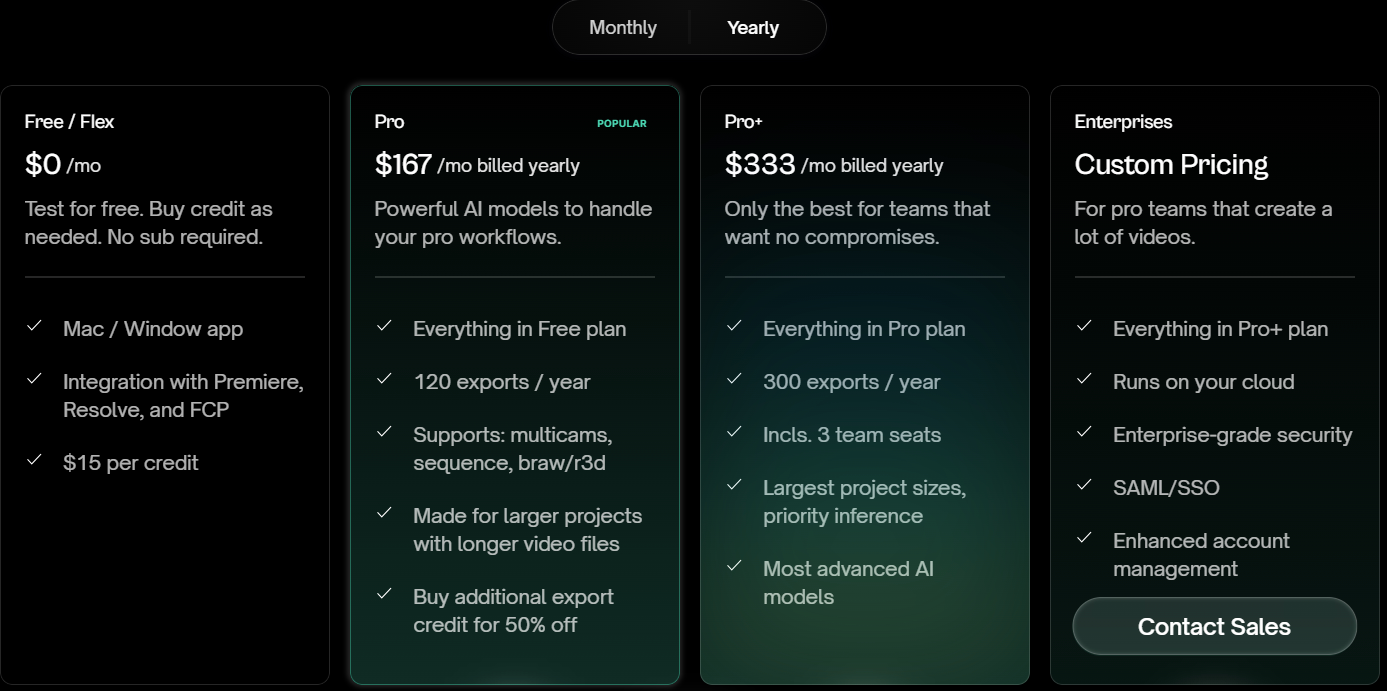
Source: https://www.heyeddie.ai/#pricing
13. OpusClip (Best for Viral Social Media Repurposing):
Core Functionality: Specialized in breaking long-form videos, such as webinars or podcasts, into short, high-engagement clips for social platforms.
Key Features: It automatically chops footage into clips and assigns each a “virality score” based on its potential performance on platforms like TikTok or Reels.
OpusClip Pricing:
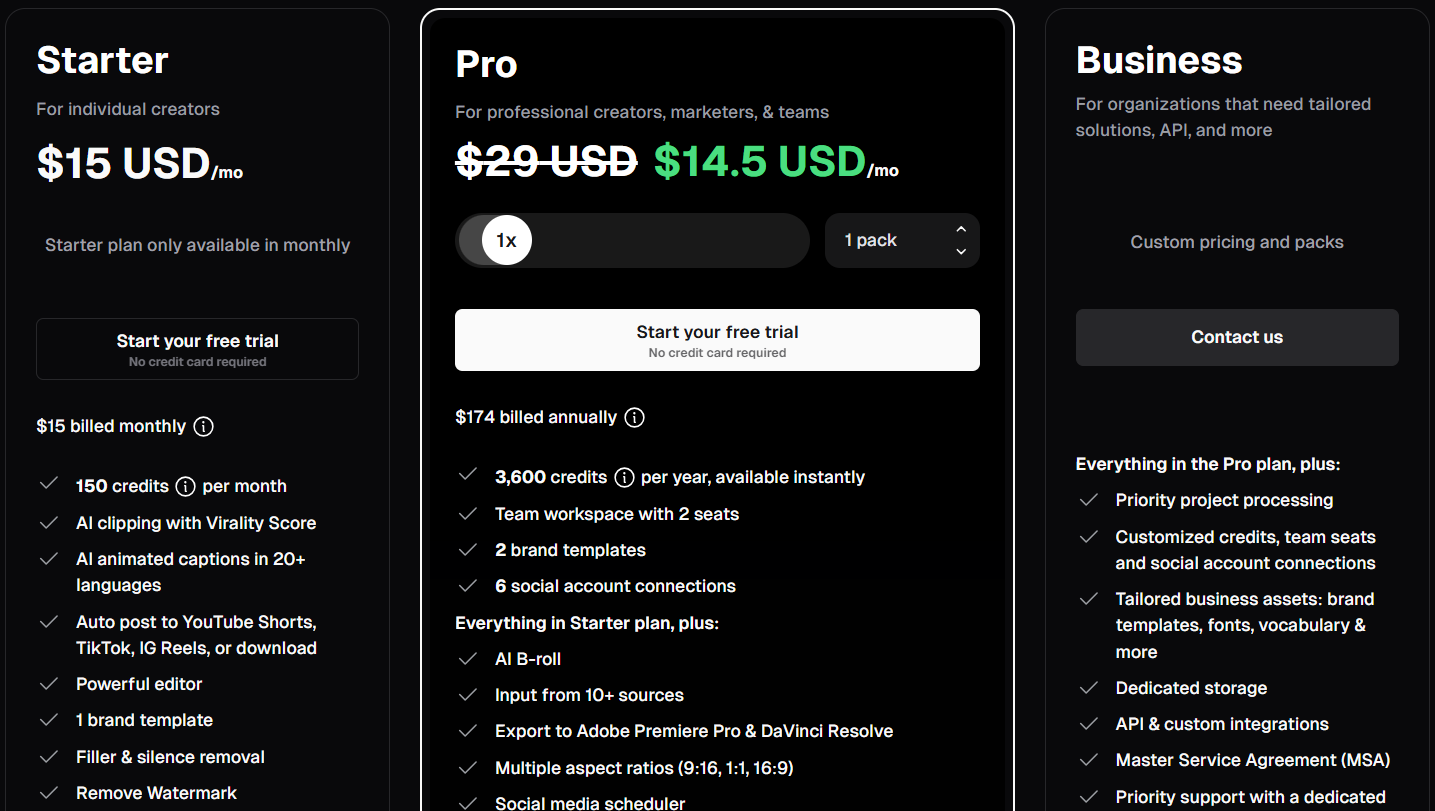
Source: https://www.opus.pro/pricing
14. Invideo AI (Best for Prompt-to-Social Media Videos):
Functionality: 14th This suite allows you to generate complete social media videos, including scripts, B-roll, voiceovers, and transitions, starting from a single text prompt.
Key Features: It includes extras like text-to-clip tools and AI avatars. It automates the process of searching stock libraries for the best matching content for your topic.
Invideo AI Pricing:
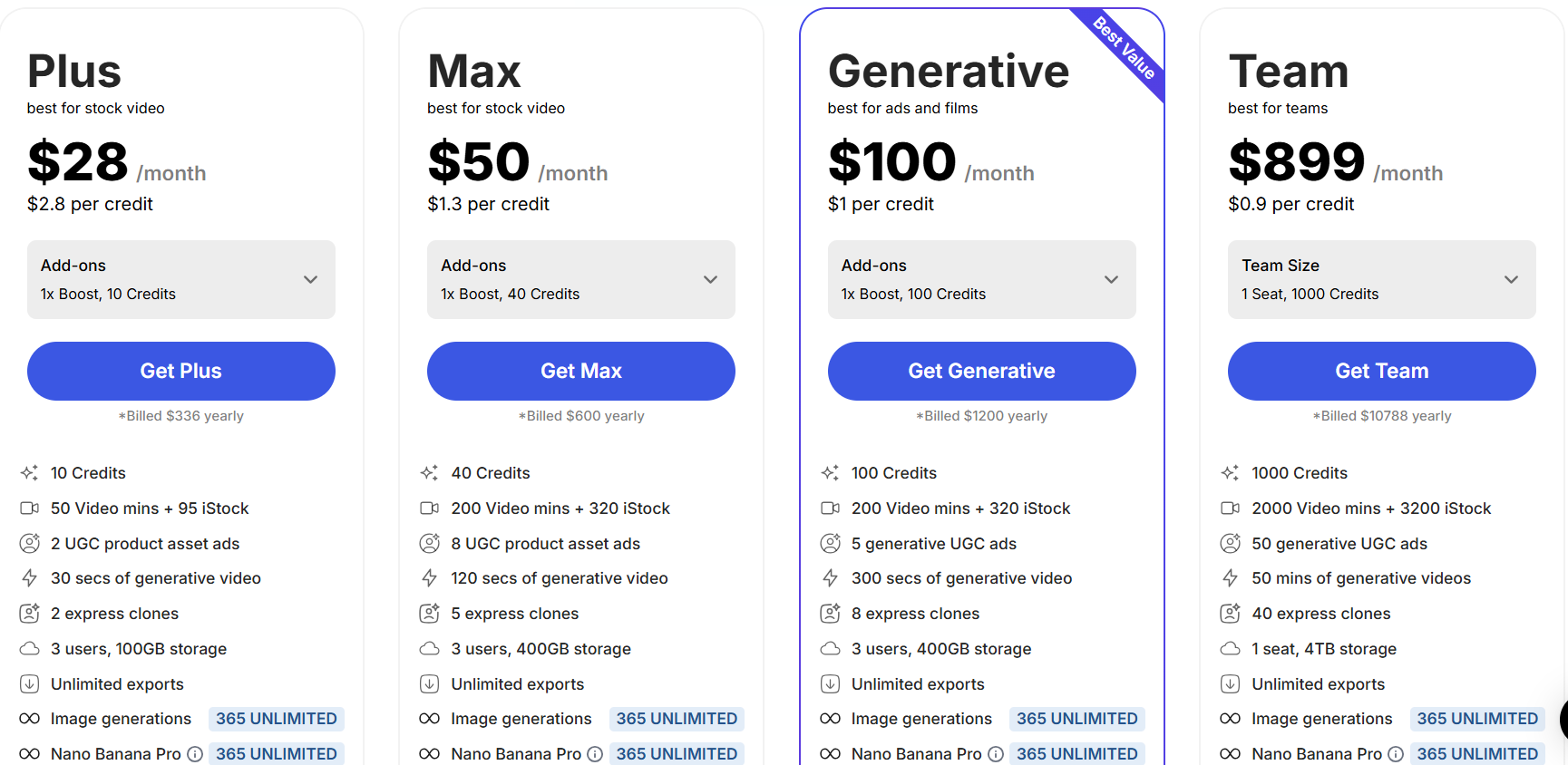
Source: https://invideo.io/pricing/
15. Vyond (Best for Animated Character Videos):
Functionality: Vyond is a specialized tool for creating professional animated character videos directly from prompts.
Key Features: It is highly effective for training videos and narrative animations.
Vyond AI Pricing:
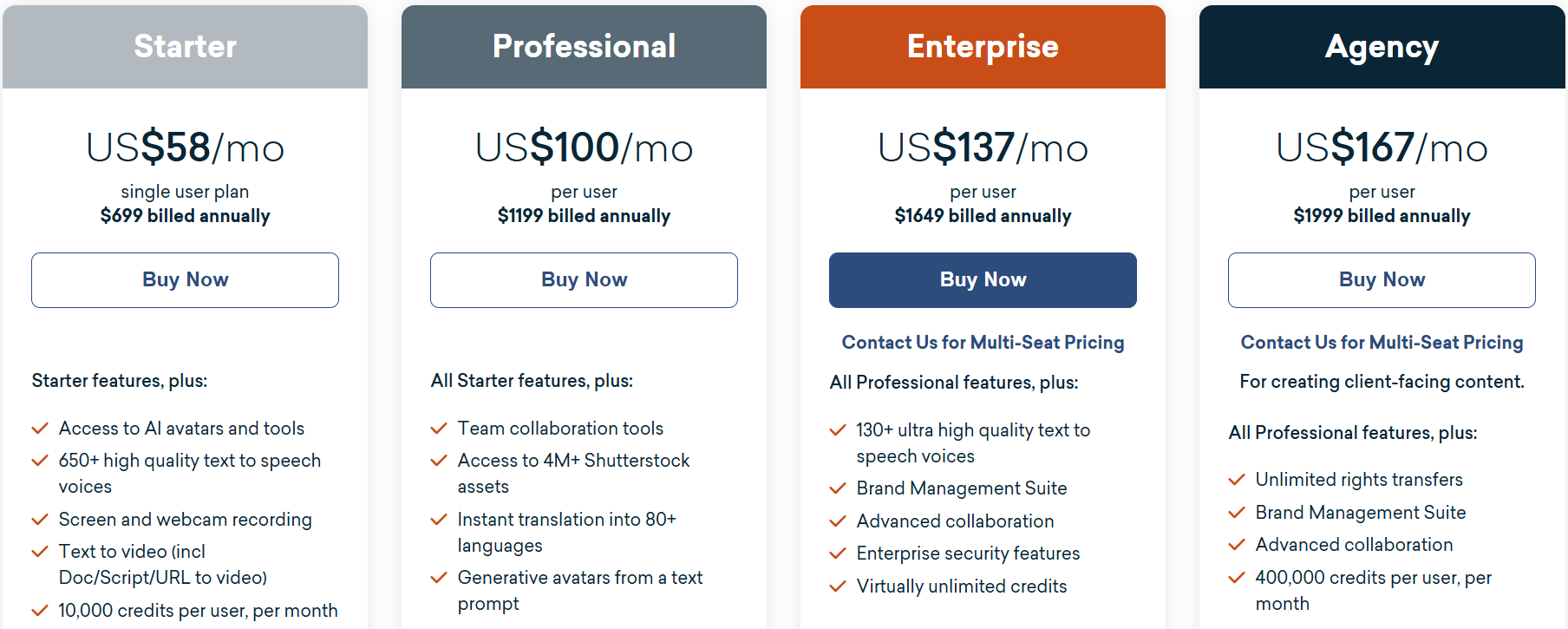
Source: https://www.vyond.com/plans/
16. Synthesia (Best for High-Quality Digital Avatars):
Functionality: Synthesia focuses on producing high-quality videos that feature realistic digital avatars.
Key Features: It is optimized for “talking head” style content, such as corporate communications and educational explainers.
Pricing:
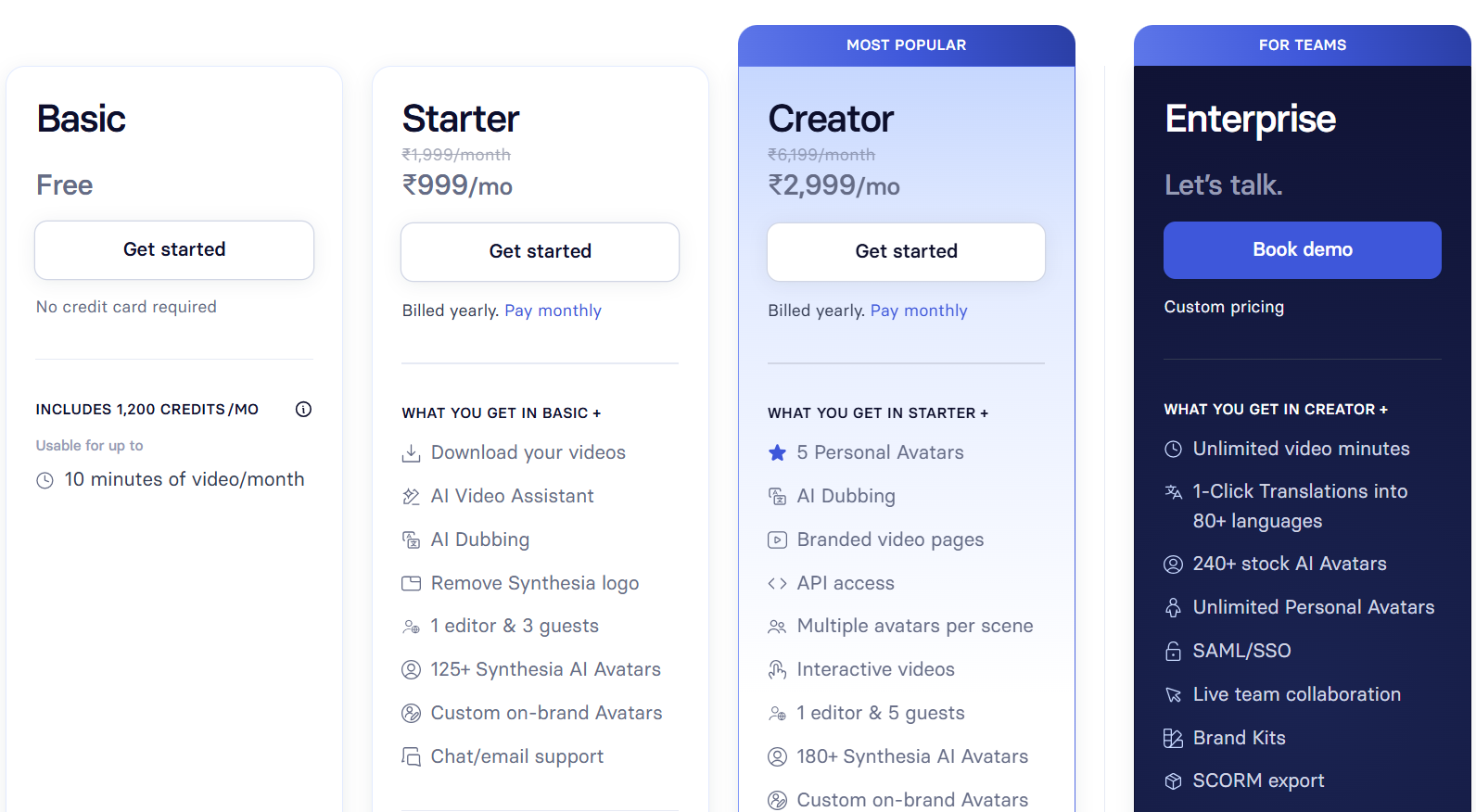
Source: https://www.synthesia.io/pricing
17. Live Avatar by HeyGen (Best for Interactive Avatars):
Functionality: While HeyGen offers standard avatars, this specific suite focuses on interactive, real-time digital avatars.
Key Features: Designed for engagement, these avatars can interact in real-time for customer service or marketing purposes.
HyGen Pricing:
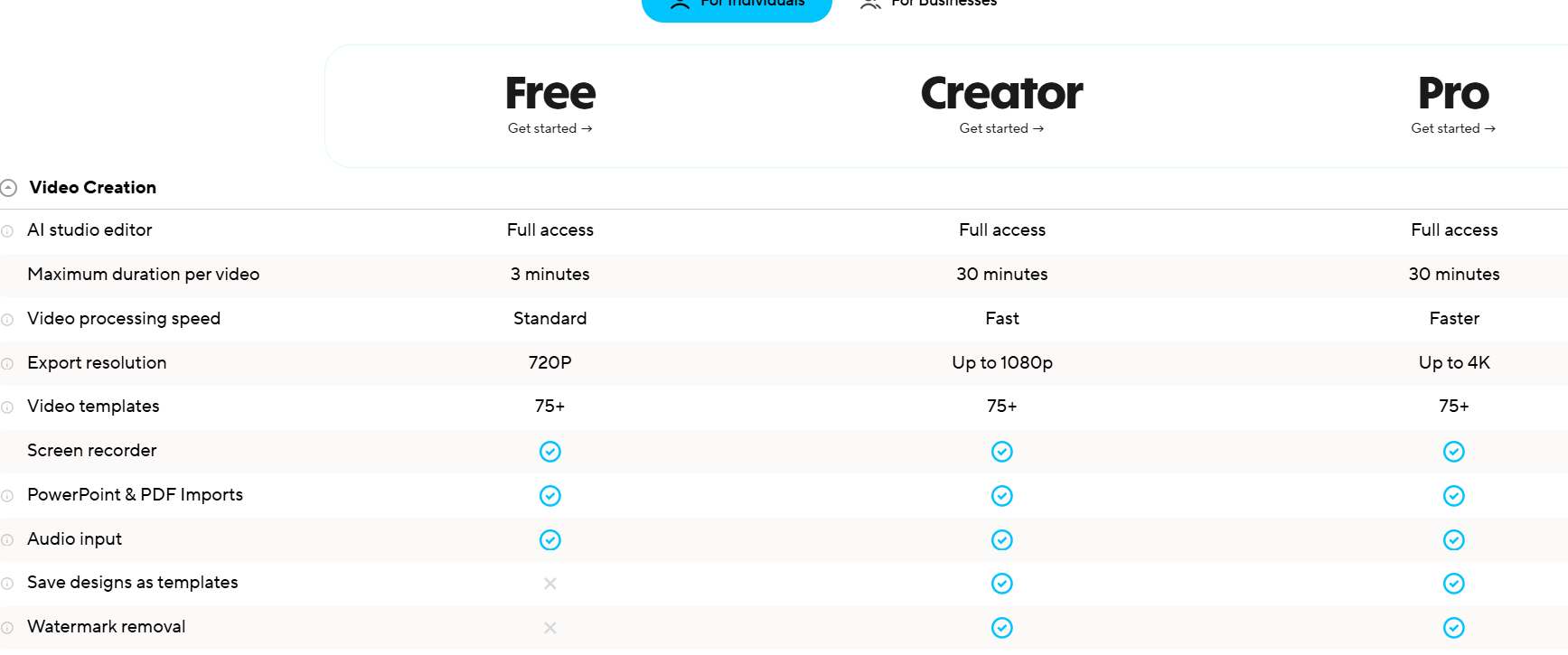
Source: https://www.heygen.com/en-in/pricing
18. revid.ai (Best for AI-Powered Templates):
Key Features: It is built for speed and efficiency by providing pre-structured templates that the AI fills with content.
revid.ai Pricing:
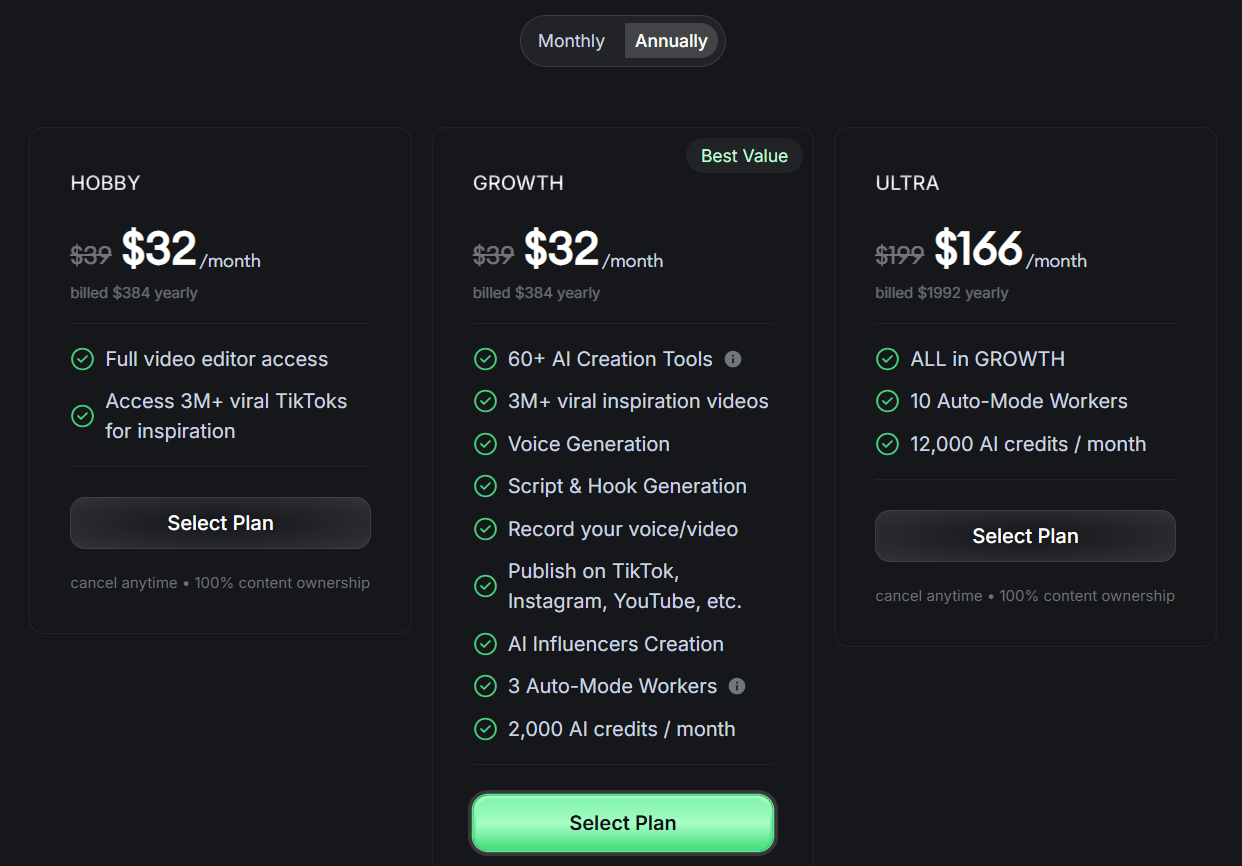
Source: https://www.revid.ai/pricing
19. Pictory (Best for Content Transformation):
Functionality: Pictory excels at taking existing assets – such as blog posts, training decks, or product photos – and transforming them into polished videos.
Key Features: It can extract highlights from long videos for social snippets and automatically sequence images with text overlays and background music.
Pictory Pricing:
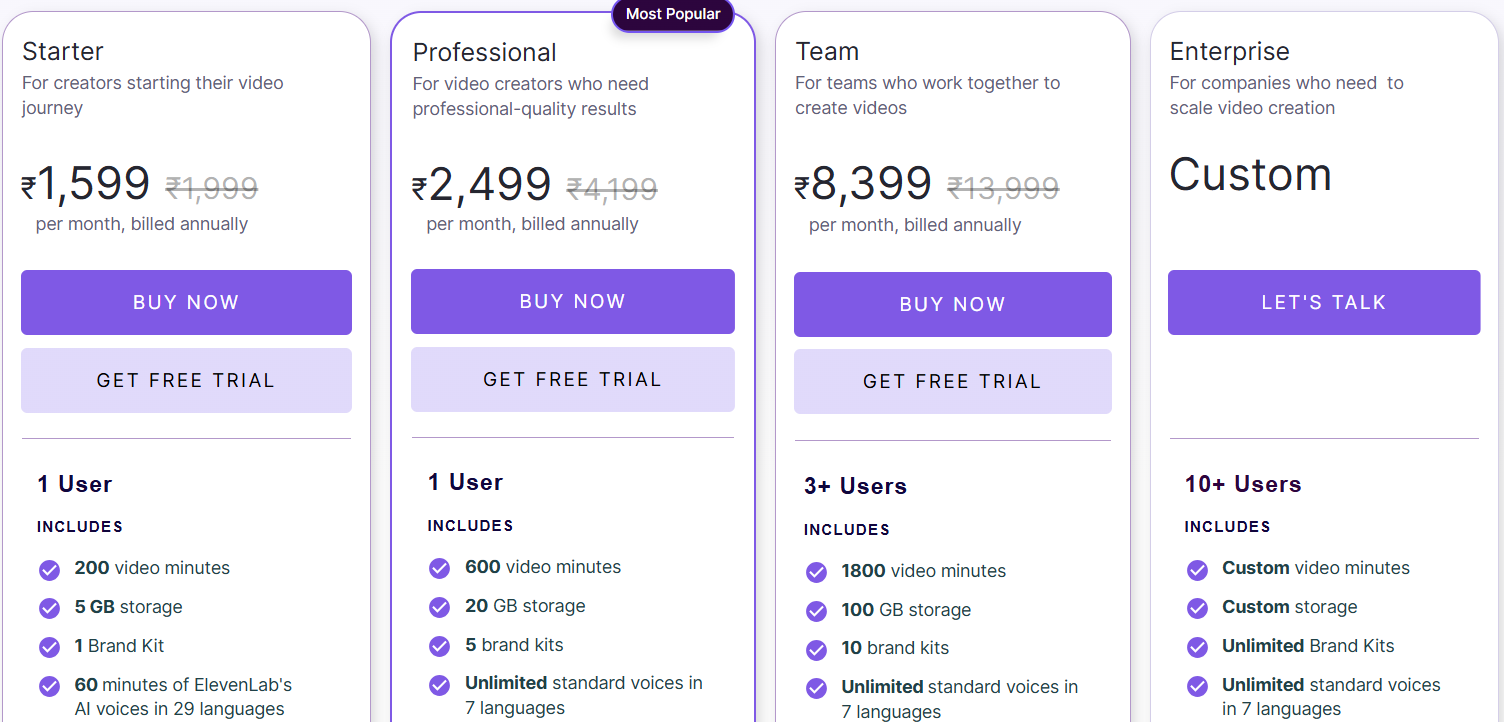
Source: https://pictory.ai/inr/pricing
Evaluation Criteria
Tools scored on AI power, output quality (720p-4K), customization, usability, uniques. Tested via prompts, footage, templates; no pro software like Premiere included for accessibility.
Conclusion
AI video generators have transformed content creation, making professional-quality output accessible to all. From Google Veo’s reliability to OpusClip’s viral clips, pick tools matching your workflow for maximum impact. Start experimenting today to scale your video production efficiently. If you’re looking for AI films, we can help – Storia Films already provides AI video production services in London (UK), Belgium, Switzerland, and India.